Recent Articles
Showing posts with label PHP. Show all posts
Showing posts with label PHP. Show all posts
Sunday, December 22, 2013
Sunday, December 22, 2013
- 0 Comments
Hiiiiii, as the title of this post suggests, this post is all about the concept of COOKIES as provided by PHP. We will here first see what does cookies means in php and then we'll see some examples of how to use these cookies in you code.

What are Cookies :
Cookies are mainly the files stored at you computer when you run any website in your browser. Usually these cookies files contains information about the user' login details when he/she login with "Remember Me" option, user id and name of a person logged in, user's current status or progress on any particular site so that whenever he login again he will be resumed from that particular progress. Cookies are stored in users browser for a limited span of time which is defined by the developer of a site which is setting a cookies in your computer system.
Using Cookies in PHP :
Syntax-
Cookies are having a very simple for their usage as shown below :
setcookie(name, value, expire, path, domain);
setcookie(name, value, expire, path, domain);
Here, setcookie is the php function to set cookies,
name is the name of the cookie variable (mandatory),
value is the value of that cookie variable whose name you have mentioned in "name" (mandatory),
expire is the time span for which you want the cookie to be saved in users's browser (mandatory),
path is the directory path if you want to set cookie for the particular directory on your site (optional), and
domain is the domain name of site on which you want to set cookie for some particular path directory (optional).
There are two more parameters in this setcookie function which are also optional namely secure and httponly, with this two variables,the syntax becomes-
setcookie(name, value, expire, path, domain, secure, httponly);
Both of these variables (secure and httponly) are boolean and accept only TRUE or FALSE in terms of values. If value of secure is set to TRUE then the cookie will only be sent to client system from the site server if the connection from the client to website is secure HTTPS.
If the value of httponly is set to TRUE then cookies will only be accessible by HTTP protocol and none of the scripting languages like javascript will be able to access the cookies.
Example To set Cookie:
Example 1:
setcookie("username","Deepaanshu",time() + (86400 * 7)); // 86400 seconds denotes 1 day
The above used method will create a cookie with cookies variable namely "username" having a value - "Deepaanshu" and "time() + (86400 * 7)" indicates that the cookie will automatically delete on the 7th day from now.
Example 2:
$username="Deepaanshu";
setcookie("username",$username,time() + (86400* 15),'/~design/','example.com',true,true);
This example will create a cookie with cookies variable namely "username" having a value - "Deepaanshu" for next 15 days from now and "/~design/","example.com" indicates that this cookie will applied on "design" directory on "example.com" domain. As this cookie is having a two true values at the last so, this cookie will only be created on user pc if connection from his side is HTTPS and this cookie will not accessible by javascript.
Example To Get Cookie variables:
if(isset($_COOKIE['username']))
{
 $login_user_name=$_COOKIE['username'];
}
else
{
 $login_user_name="Guest";
}
echo 'Welcome Back '.$login_user_name;  // This will echo Welcome Back Deepaanshu if $_COOKIE['username'] is set with a value "Deepaanshu"
Deleting Cookies :
To delete a cookie you don't have any unset function like sessions but rather you can make the cookie expire by giving it a time earlier then the current time and making its value blank.
setcookie("username", "", time() - 3600); //this will make the cookie to expire as time given to it is a hour ago from current time.
Hope you like this post……..Please Comment…………!!!!!!!!!
Monday, December 16, 2013
Monday, December 16, 2013
- 0 Comments
Hiiii, We all know that managing Dates and Dates formats is a very important work when it comes to using dates in programming or when you have to use the dates fetched from the database in the format other then as it is saved in database.
In PHP, some people mostly beginners find it difficult to deal with date and time with different formats like 24 hour or 12 hour, some find it difficult to get current date/ time, you current timezone with GMT difference.
Mostly people face trouble in the situation where a person has to change the format of the the data fetched from database or date got from the form fields.
So, here in this post I'll be telling you how to use PHP Date() with its different forms to gets every date time related data as possible like- current date/ time, custom date with different formats, custom time with different formats and changing the format of date fetched from the database .

DEMO BEGINS :
<?php
 // Connection to mysql
 $link = mysql_connect('localhost', 'root', 'root');
 if (!$link) {
 die('Not connected : ' . mysql_error());
 }

 // Selecting Database
 $db_selected = mysql_select_db('wordpress', $link);
 if (!$db_selected) {
 die ('Can\'t use wordress : ' . mysql_error());
 }

 $query="select wp_posts.post_date from wp_posts where wp_posts.ID=27";
 $line=mysql_query($query);
 $result=mysql_fetch_assoc($line);
 $post_date=$result['post_date'];
 echo $post_date."<br/>";        // prints in this format-  2013-10-31 07:59:13

 echo date('d M Y', strtotime($post_date))."<br/>";  // prints in this format- 31 Oct 2013

 echo date('d/m/y', strtotime($post_date))."<br/>";  // prints in this format- 31/10/13

 echo date('D', strtotime($post_date))."<br/>";   // prints in this format- Thu


 // Taking Custom Dates
 $date="2013-01-07";
 echo date('d M Y', strtotime($date))."<br/>";   // prints in this format- 31 Oct 2013 with leading zeros

 echo date('j M Y', strtotime($date))."<br/>";   // prints in this format- 31 Oct 2013 without leading zeros


 // Time notations
 echo date('H:i:s', strtotime($post_date))."<br/>";  // prints in this format- 07:59:13

 echo date('H:i:s a', strtotime($post_date))."<br/>"; // prints in this format- 07:59:13 am

 echo date('H:i:s A', strtotime($post_date))."<br/>"; // prints in this format- 07:59:13 AM


 // Taking Custom TIme
 $time="15:30:41";
 echo date('h:i:s A', strtotime($time))."<br/>";   // prints in this format- 03:30:41 PM in 12h format

 echo date('H:i:s A', strtotime($time))."<br/>";   // prints in this format- 03:30:41 PM in 24h format without trailing zeros

 echo date('g:i:s A', strtotime($time))."<br/>";   // prints in this format- 03:30:41 PM in 12h format

 echo date('G:i:s A', strtotime($time))."<br/>";   // prints in this format- 03:30:41 PM in 24h format without trailing zeros

 echo date('O')."<br/>";         // prints the Difference to Greenwich time (GMT) in hours


 // Current Date and Time
 echo "Current Date :".date('d M Y')."<br/>";
 echo "Current Time :".date('h:i:s A');
?>
Hope you like this post……..Please Comment…………!!!!!!!!!Thursday, December 5, 2013
Thursday, December 5, 2013
- 0 Comments
Hiiiiii, people who are new-new php developers came across a situation when they have to develop a user login system. It seems to be a very hard to develop login system by validating user details from database for the new developers but actually this task is very. You can send the username and password values to the next page or same page by just html form POST method or using AJAX. But this tutorial is taking into cosideration that a developer is not having or completely unaware of knowledge of how to use AJAX for data sending , So, we will be just using core php to implement a login system.
I this tutorial, user is validated with the values exist i database, session variables like user id & username are set so that you can use that variables on anyother pages, form variables are sent to next page.
Demo :

Code Begins :
File Structure :
Main Directory --
--> check.php
--> index.php
--> home.php
check.php :
<?php
$link = mysql_connect('localhost', 'root', '');
if (!$link) {
    die('Not connected : ' . mysql_error());
}

$db_selected = mysql_select_db('test', $link);
if (!$db_selected) {
    die ('Can\'t use test table : ' . mysql_error());
}

$username=$_POST['username'];
$password=$_POST['password'];

$query="select * from user where username='".$username."'";
$result=mysql_query($query);
$records=mysql_fetch_array($result);

if($records)
{
 if($password==$records['password'])
 {
  session_start();
  $_SESSION['username']=$records['username'];
  $_SESSION['userid']=$records['id'];
  header('Location: home.php');
 }
 else
 {
  $msg="Password Incorrect";
  header('Location: index.php?msg='.$msg);
 }
}
else
{
 $msg="Username Incorrect";
 header('Location: index.php?msg='.$msg);
}
?>
index.php :
<!DOCTYPE HTML>
<html>
<head>
<title>Login System</title>
</head>
<body>

<h1>Login Form</h1>
<?php

if(isset($_GET['msg']))
{
 $msg=$_GET['msg'];
 echo '<p><font color="red">';
 echo $msg;
 echo '</font></p>';
}
?>
<form action="check.php" method=POST>
  <label for="username">Username</label>
  <input type="text" name="username" id="username" placeholder="username"><br>
  <label for="password">Password</label>
  <input type="password" name="password" id="password"  placeholder="password"><br><br>
  <input type="submit" value="Submit">
</form>
</body>
</html>
home.php :
<?php
session_start();
$username=$_SESSION['username'];
$userid=$_SESSION['userid'];

echo "You Are Logged IN -<b>".$username."</b> and your ID is -<b>".$userid."</b>";
?>
To run this tutorial , you need a database and a table containing users records. In this tutorial I am using a database namely - "test" with a table name - "user". This "user" table is having three columns as follows : id, username and password .
Monday, November 18, 2013
Monday, November 18, 2013
- 0 Comments
Hiiiii, while developing php projects, we sometimes encounter a problem to redirect your page to next page and redirecting it to the previous requesting page or anyother pages then you want the url of the page on which you want to redirect. Sometimes it is needed to to get the host names, server names etc. So, in this post I'll be telling you many url redirection method in this post.

CODE EXAMPLE BEGINS :
<?php
echo getcwd() . "</br>";
// Returns Full path in Root Directory
Example - /var/www/test/redirections_url
echo $_SERVER['PHP_SELF']. "</br>";
// Returns Full path in your WWW or Htdocs Directory
Example - /test/redirections_url/test.php
echo $_SERVER['DOCUMENT_ROOT']. "</br>";
// Returns Full path in Root Directory to your WWW or Htdocs Directory
Example - /var/www
echo $_SERVER["REQUEST_URI"]. "</br>";
// Returns Full path in your WWW or Htdocs Directory same as $_SERVER['PHP_SELF']
Example - /test/redirections_url/test.php
echo $_SERVER["SERVER_NAME"]. "</br>";
// Returns your Hostname or Server Name
Example - localhost
echo $_SERVER['HTTP_HOST']. "</br>";
// Returns your Hostname or Server Name
Example - localhost
echo $_SERVER['REMOTE_ADDR']. "</br>";
// Returns IP Address of the person accessing your page
echo dirname($_SERVER['PHP_SELF']). "</br>";
// Returns Full path in your WWW or Htdocs Directory to current file URL
Example - /test/redirections_url/
echo "Complete Path - ".$_SERVER['HTTP_HOST'].dirname($_SERVER['PHP_SELF']);
// return Complete URL to parent folder of the requesting page
echo $_SERVER['HTTP_REFERER'];
// Returns the path to the requesting urls
?>
Hope you like this post……..Please Comment…………!!!!!!!!!
Sunday, November 17, 2013
Sunday, November 17, 2013
- 0 Comments
Hiiiii, if you are a php developer than sometimes you encounter a problem of making a small array out of large array on some conditions basis or you want to insert some elements into the array. PHP is having many easy method to do the above defined work.You can insert the elements in array in various conditional statements like for loop, foreach loop , while loop etc. In this example I'll be showing two array insertion method in two different loops.

CODE BEGINS :
<?php
$link = mysql_connect('localhost', 'root', '');
if (!$link) {
die('Not connected : ' . mysql_error());
}
$db_selected = mysql_select_db('records', $link);
if (!$db_selected) {
die ('Can\'t use records : ' . mysql_error());
}
$smallarray1=array(); // first small array
$query="select * from users";
$line=mysql_query($query);
while($result=mysql_fetch_array($line))
{
if(1==1)
{
array_push($smallarray1,$result['userID']); // insert elements in array
$smallarray2[]=$result['userName']; //second small array
}
}
foreach ($smallarray2 as $newarray)
{
$smallarray3[]=$newarray; // third new array
}
// TO print the above two developed small arrays
echo "<pre>";
print_r($smallarray1);
print_r($smallarray2);
print_r($smallarray3);
echo "</pre>";
?>
Hope you like this post……..Please Comment…………!!!!!!!!!
Friday, November 15, 2013
Friday, November 15, 2013
- 0 Comments
Hiiiii, being a developer if you want to contact or request APIs or you have to request payment gateway for sending the amount deduction request to payment sites then you can contact them with the help of form submissions or using web services . Most of us don't know how to use web services and to use which web services for your work. so, here in this post I'll give a tutorial of using a web services.
Web services are used for connection between two areas of data(sites) over network. For this tutorial, I will be using "curl" web services to connect to various APIs. Curl uses HTML, javascript and high level languages like "PHP",etc to perform its task of connection between various sites. Using curl we can send a data in the form of XML or any other format which your requesting APIs demands.

CODE BEGINS :
<?php
$url = 'https://www.example.com/receiver';
$fields = array(
'ssl_merchant_id'=>'your user id',
'ssl_user_id'=>'your user id',
'ssl_pin'=>'your user pin',
'ssl_test_mode'=>'false',
'ssl_error_url'=>'http://example.com/unsuccess',
'ssl_receipt_apprvl_get_url'=>'http://example.com/success',
'ssl_transaction_type'=>'ccsale',
'ssl_billing_cycle'=>'ANNUALLY',
'ssl_next_payment_date'=>'11/14/2013',
'ssl_amount'=>'45',
'ssl_card_number'=>'your credit card number',
'ssl_exp_date'=>'1214',
'ssl_cvv2cvc2_indicator'=>'1',
'ssl_cvv2cvc2'=>'your card cvv number',
'ssl_first_name'=>'XYZ',
'ssl_last_name'=>'ABC',
'ssl_email'=>'test@test.com',
'ssl_avs_zip'=>'zip code',
'ssl_invoice_number'=>urlencode(rand()),
);
//initialize the post string variable
$fields_string = '';
//build the post string
foreach($fields as $key=>$value) { $fields_string .=$key.'='.$value.'&'; }
rtrim($fields_string, "&");
//open curl session
$ch = curl_init();
//begin seting curl options
//set URL
curl_setopt($ch, CURLOPT_URL, $url);
//set method
curl_setopt($ch, CURLOPT_POST, 1);
//set post data string
curl_setopt($ch, CURLOPT_POSTFIELDS, $fields_string);
//these two options are frequently necessary to avoid SSL errors with PHP
curl_setopt($ch, CURLOPT_SSL_VERIFYPEER, false);
curl_setopt($ch, CURLOPT_SSL_VERIFYHOST, false);
//perform the curl post and store the result
$result = curl_exec($ch);
//close the curl session
curl_close($ch);
//a nice message to prevent people from seeing a blank screen
echo "Processing, please wait..."
?>
Hope you like this post……..Please Comment…………!!!!!!!!!
Monday, November 11, 2013
Monday, November 11, 2013
- 0 Comments
Hiiiii, If you are a PHP Developer then you generally face a situation when you want to echo a complete array in the complete array format with indexes in the complete proper format. You get this array echo problem when you post the form variables on next page or on same page, when you fetch the records from database or when you the variables in URL.

So, in this post I'll be telling you how to echo complete array elements in all the above discussed methods :
Code Begins :
--> Form Method :
<form action="" method="POST">
<input type="text" name="first name">
<input type="text" name="last name">
<input type="submit" value="submit">
</form>
To get the variables of this form in the array format , use the code below :
<?php
echo "<pre>";
print_r($_POST);
echo "</pre>";
?>
--> URL Method :
http://www.example.com/?last_name=abc&first_name=def
To get the variables of this url in the array format , use the code below :
<?php
echo "<pre>";
print_r($_REQUEST);
echo "</pre>";
?>
--> Fetch Array from Database :
$query=mysql_query("select * from tablename"); this table is having only two columns - first_name and last_name
$result=mysql_fetch_array($query);
To display this database fetched result in the array format , use the code below :
<?php
echo "<pre>";
print_r($result);
echo "</pre>";
?>
All this above examples will give the output as :
Array
(
    [first_name] => abc
    [last_name] => def
)
Hope you like this post……..Please Comment…………!!!!!!!!!
Thursday, November 7, 2013
Thursday, November 7, 2013
- 0 Comments
Hiiii, when we make some user registration system in our project or code then we always want to keep the user details like password etc very secure which is not easy to detect and which is random for each and every user. You can try to make random password by applying some logic but here in this demo I'll be providing you with a very simple and short code to generate a random password.
This random passwords are also necessary when you have to send a confirmation mail to users with some password different from their identities. Users have to change their random passwords to their own password on first login.
Don't interpret the meaning of these random password with passwords generated by some encryption techniques like md5 hash, etc. The random passwords here are generated in php by making a string with some logic by adding a digit to that password string.
In this technique which I'll be showing here, you can generate the password of your desired length.

CODE BEGINS :
<?php
function get_random_string($valid_chars,$length)
{
// start with an empty random string
$random_string = "";
// count the number of chars in the valid chars string so we know how many choices we have
$num_valid_chars = strlen($valid_chars);
// repeat the steps until we've created a string of the right length
for ($i = 0; $i < $length; $i++)
{
// pick a random number from 1 up to the number of valid chars
$random_pick = mt_rand(1, $num_valid_chars);
// take the random character out of the string of valid chars
// subtract 1 from $random_pick because strings are indexed starting at 0, and we started picking at 1
$random_char = $valid_chars[$random_pick-1];
// add the randomly-chosen char onto the end of our string so far
$random_string .= $random_char;
}
// return our finished random string
return $random_string;
}
$chars = 'abcdefghijklmnopqrstuvwxyzABCDEFGHIJKLMNOPQRSTUVWXYZ0123456789';
$length=10;
$pass=get_random_string($chars,$length);
echo $pass;
?>
Hope you like this post……..Please Comment…………!!!!!!!!!
Monday, November 4, 2013
Monday, November 4, 2013
- 0 Comments
Hiiiii, we always find it difficult to work with files in our early stages of programming in any language. But sometimes it is necessary to work with files when it comes to reading and writing text files, doc files or html files. So, in this tutorial I am providing you a very simple code for file handling. It is easy to understand and execute. I have tested this code with text files and html files but you can try it with different format files also like doc, etc.
CODE BEGINS :
<?php$read_file=getcwd()."/b.txt";
$dir=getcwd();
$file = fopen($read_file, "r");
$file_contents=array();
echo $file_contents = file_get_contents($read_file);
fclose($file);
echo $write_file=getcwd()."/c.txt";
while ($file_contents)
{
$fle1 = fopen($write_file,'w') or die("Could not find file");
fwrite($fle1,$file_contents);
}
?>
Hope you like this post……..Please Comment…………!!!!!!!!!
Sunday, October 20, 2013
Sunday, October 20, 2013
- 0 Comments
Hiiiiii, We all know that its common practice to send mails in our PHP website and you can perform this mail sending task by PHP mail() function , but the problem with this function is that it works only when you site is live and you have put your website on some web server. But what when you have to test mail sending your localhost in your local machine at the time of developing. You can solve this problem by using PHP mailer class in your website to send mails from your local host .
To use PHP mailer class in your code , you have to made some changes in php.in to make PHP mailer class work and to see the changes, CLICK HERE .

You can download the complete code required for this tutorial FROM HERE or you can download the code files except PHP mailer class from below :
CODE FILES :
example.php :
<?php
$message = "Your message body" ;
require_once("class.phpmailer.php");
$mail = new PHPMailer();
$mail->IsSMTP();
$mail->SMTPAuth = true;
$mail->Host = 'smtp.gmail.com';
$mail->Port = 465;
$mail->SMTPSecure = 'ssl';
$mail->Username = "youremail@gmail.com"; // my email which I hope to receive the data inputed on the field
$mail->Password = "password";
$email="abc@example.com"; // email which you want to show other than original sender
$mail->SetFrom($email, 'Test Mail'); // name of this another email mentioned above
$address = "recepient@example.com"; // recepient address
$mail->AddAddress($address, "Fine Design"); // Name of the Recepeint
$mail->Subject = "Fine Design - Avise me!"; // Subject
$mail->Body = $message;
if(!$mail->Send()) {
echo'nt sent';
echo'<span><b>';
echo $mail->ErrorInfo;
echo '</span></b>';
echo'</div>';
} else {
header("Location: ./thank-you.php");
}
?>
thank-you.php :
<?php
// Process the submitted data
echo "<div style='text-align:center;'><h2>Thank you for Contacting Us!</h2></div> ";
$t2lpostData = $_POST;
echo "</div>";
?>
Hope you like this post……..Please Comment…………!!!!!!!!!
Hiiiiii, There are some changes need to be made in the php.ini of your Xampp/Wamp/Lamp Server to use PHP MAILER CLASS to send mails from your LOCALHOST. PHP mailer class allows you to send mails from your local machine. To send mails ,PHp mailer class requires some extensions like soap, ssl, sockets but these are commented in php.ini file so,we just have to uncomment those extensions.

Just finds the following 3 lines in your php.ini files and remove the ';' before this lines and just save your php.ini file :
- extension=php_openssl.dll
- extension=php_soap.dll
- extension=php_sockets.dll
After saving your php.ini file , you can send mails from your localhost.
Hope you like this post……..Please Comment…………!!!!!!!!!
Friday, October 18, 2013
Friday, October 18, 2013
- 0 Comments
Hiiii, we all know that Google maps is powerful application which allows to get location information with actual coordinates value. You may have seen Google maps on some website demanding for you location and it calculates the coordinates correspondingly according to your location. So, here in this tutorial, I will be teaching you how to integrate Google maps on your website.


In these maps, coordinates values are automatically fetch when the user puts marker on the map. This tutorial which I will be teaching here will have Google map, putting,hiding and deleting markers on the map functionality.
It is very light weight Google Maps code and easy to use and it is mostly build in javascript.
CODE BEGINS :
<!DOCTYPE html>
<html>
<head>
<script
src="http://maps.googleapis.com/maps/api/js?key=AIzaSyDY0kkJiTPVd2U7aTOAwhc9ySH6oHxOIYM&sensor=false">
</script>
<html>
<head>
<script
src="http://maps.googleapis.com/maps/api/js?key=AIzaSyDY0kkJiTPVd2U7aTOAwhc9ySH6oHxOIYM&sensor=false">
</script>
<script>
var myCenter=new google.maps.LatLng(51.508742,-0.120850);
var markers = [];
var map;
function initialize()
{
var mapProp = {
center:myCenter,
zoom:5,
mapTypeId:google.maps.MapTypeId.ROADMAP
};
var myCenter=new google.maps.LatLng(51.508742,-0.120850);
var markers = [];
var map;
function initialize()
{
var mapProp = {
center:myCenter,
zoom:5,
mapTypeId:google.maps.MapTypeId.ROADMAP
};
map=new google.maps.Map(document.getElementById("googleMap"),mapProp);
google.maps.event.addListener(map, 'click', function(event) {
placeMarker(event.latLng);
placeMarker(event.latLng);
});
function placeMarker(location) {
var marker = new google.maps.Marker({
position: location,
map: map,
});
var marker = new google.maps.Marker({
position: location,
map: map,
});
markers.push(marker);
var infowindow = new google.maps.InfoWindow({
content: 'Latitude: ' + location.lat() + '<br>Longitude: ' + location.lng()
});
infowindow.open(map,marker);
}
}
var infowindow = new google.maps.InfoWindow({
content: 'Latitude: ' + location.lat() + '<br>Longitude: ' + location.lng()
});
infowindow.open(map,marker);
}
}
function setAllMap(map) {
for (var i = 0; i < markers.length; i++) {
markers[i].setMap(map);
}
}
for (var i = 0; i < markers.length; i++) {
markers[i].setMap(map);
}
}
function clearMarkers() {
setAllMap(null);
}
setAllMap(null);
}
function showMarkers() {
setAllMap(map);
}
setAllMap(map);
}
// Deletes all markers in the array by removing references to them.
function deleteMarkers() {
clearMarkers();
markers = [];
}
function deleteMarkers() {
clearMarkers();
markers = [];
}
google.maps.event.addDomListener(window, 'load', initialize);
</script>
</head>
</script>
</head>
<body>
<input onclick="clearMarkers();" type=button value="Hide Markers">
<input onclick="showMarkers();" type=button value="Show All Markers">
<input onclick="deleteMarkers();" type=button value="Delete Markers">
<div id="googleMap" style="width:700px;height:400px;"></div>
</body>
</html>
<input onclick="clearMarkers();" type=button value="Hide Markers">
<input onclick="showMarkers();" type=button value="Show All Markers">
<input onclick="deleteMarkers();" type=button value="Delete Markers">
<div id="googleMap" style="width:700px;height:400px;"></div>
</body>
</html>
Hope you like this post……..Please Comment…………!!!!!!!!!
Friday, October 4, 2013
Friday, October 4, 2013
- 0 Comments
Hiiiii, if you are a PHP developer and you are developing an admin section or any other section showing table records then you will need a pagination in that table to limit the records to be viewed on one page. Applying pagination is very easy and simple.
So, here is the code to apply pagination to the records fetch from a database table.
For this tutorial, we need in total 3 files. The name and code of these files are as follows :
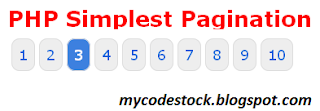

Demo Begins :
1. test.php :
<html>
<head><link href="style.css" rel="stylesheet" type="text/css"></head>
</body>
<?php
/*
Place code to connect to your DB here.
*/
include('config.php'); // include your code to connect to DB.
<head><link href="style.css" rel="stylesheet" type="text/css"></head>
</body>
<?php
/*
Place code to connect to your DB here.
*/
include('config.php'); // include your code to connect to DB.
$tbl_name=""; //your table name
// How many adjacent pages should be shown on each side?
$adjacents = 3;
// How many adjacent pages should be shown on each side?
$adjacents = 3;
/* First get total number of rows in data table.
If you have a WHERE clause in your query, make sure you mirror it here. */
$query = "SELECT COUNT(*) as num FROM $tbl_name";
$total_pages = mysql_fetch_array(mysql_query($query));
$total_pages = $total_pages['num'];
If you have a WHERE clause in your query, make sure you mirror it here. */
$query = "SELECT COUNT(*) as num FROM $tbl_name";
$total_pages = mysql_fetch_array(mysql_query($query));
$total_pages = $total_pages['num'];
/* Setup vars for query. */
$targetpage = "filename.php"; //this file name (the name of this file)
$limit = 5;
if($_GET['page']){ //how many items to show per page
$page = $_GET['page'];
if($page)
$start = ($page - 1) * $limit; //first item to display on this page
else
$start = 0; //if no page var is given, set start to 0
}
/* Get data. */
$sql = "SELECT * FROM $tbl_name LIMIT $start, $limit";
$result = mysql_query($sql);
$targetpage = "filename.php"; //this file name (the name of this file)
$limit = 5;
if($_GET['page']){ //how many items to show per page
$page = $_GET['page'];
if($page)
$start = ($page - 1) * $limit; //first item to display on this page
else
$start = 0; //if no page var is given, set start to 0
}
/* Get data. */
$sql = "SELECT * FROM $tbl_name LIMIT $start, $limit";
$result = mysql_query($sql);
/* Setup page vars for display. */
if ($page == 0) $page = 1; //if no page var is given, default to 1.
$prev = $page - 1; //previous page is page - 1
$next = $page + 1; //next page is page + 1
$lastpage = ceil($total_pages/$limit); //lastpage is = total pages / items per page, rounded up.
$lpm1 = $lastpage - 1; //last page minus 1
if ($page == 0) $page = 1; //if no page var is given, default to 1.
$prev = $page - 1; //previous page is page - 1
$next = $page + 1; //next page is page + 1
$lastpage = ceil($total_pages/$limit); //lastpage is = total pages / items per page, rounded up.
$lpm1 = $lastpage - 1; //last page minus 1
/* Now we apply our rules and draw the pagination object.
We're actually saving the code to a variable in case we want to draw it more than once. */
$pagination = "";
if($lastpage > 1)
{
$pagination .= "<div class=\"pagination\">";
//previous button
if ($page > 1)
$pagination.= "<a href=\"$targetpage?page=$prev\"><<< previous</a>";
else
$pagination.= "<span class=\"disabled\">� previous</span>";
We're actually saving the code to a variable in case we want to draw it more than once. */
$pagination = "";
if($lastpage > 1)
{
$pagination .= "<div class=\"pagination\">";
//previous button
if ($page > 1)
$pagination.= "<a href=\"$targetpage?page=$prev\"><<< previous</a>";
else
$pagination.= "<span class=\"disabled\">� previous</span>";
//pages
if ($lastpage < 7 + ($adjacents * 2)) //not enough pages to bother breaking it up
{
for ($counter = 1; $counter <= $lastpage; $counter++)
{
if ($counter == $page)
$pagination.= "<span class=\"current\">$counter</span>";
else
$pagination.= "<a href=\"$targetpage?page=$counter\">$counter</a>";
}
}
elseif($lastpage > 5 + ($adjacents * 2)) //enough pages to hide some
{
//close to beginning; only hide later pages
if($page < 1 + ($adjacents * 2))
{
for ($counter = 1; $counter < 4 + ($adjacents * 2); $counter++)
{
if ($counter == $page)
$pagination.= "<span class=\"current\">$counter</span>";
else
$pagination.= "<a href=\"$targetpage?page=$counter\">$counter</a>";
}
$pagination.= "...";
$pagination.= "<a href=\"$targetpage?page=$lpm1\">$lpm1</a>";
$pagination.= "<a href=\"$targetpage?page=$lastpage\">$lastpage</a>";
}
//in middle; hide some front and some back
elseif($lastpage - ($adjacents * 2) > $page && $page > ($adjacents * 2))
{
$pagination.= "<a href=\"$targetpage?page=1\">1</a>";
$pagination.= "<a href=\"$targetpage?page=2\">2</a>";
$pagination.= "...";
for ($counter = $page - $adjacents; $counter <= $page + $adjacents; $counter++)
{
if ($counter == $page)
$pagination.= "<span class=\"current\">$counter</span>";
else
$pagination.= "<a href=\"$targetpage?page=$counter\">$counter</a>";
}
$pagination.= "...";
$pagination.= "<a href=\"$targetpage?page=$lpm1\">$lpm1</a>";
$pagination.= "<a href=\"$targetpage?page=$lastpage\">$lastpage</a>";
}
//close to end; only hide early pages
else
{
$pagination.= "<a href=\"$targetpage?page=1\">1</a>";
$pagination.= "<a href=\"$targetpage?page=2\">2</a>";
$pagination.= "...";
for ($counter = $lastpage - (2 + ($adjacents * 2)); $counter <= $lastpage; $counter++)
{
if ($counter == $page)
$pagination.= "<span class=\"current\">$counter</span>";
else
$pagination.= "<a href=\"$targetpage?page=$counter\">$counter</a>";
}
}
}
//next button
if ($page < $counter - 1)
$pagination.= "<a href=\"$targetpage?page=$next\">next >>></a>";
else
$pagination.= "<span class=\"disabled\">next >>></span>";
$pagination.= "</div>\n";
}
?>
<?php
while($row = mysql_fetch_array($result))
{
if ($lastpage < 7 + ($adjacents * 2)) //not enough pages to bother breaking it up
{
for ($counter = 1; $counter <= $lastpage; $counter++)
{
if ($counter == $page)
$pagination.= "<span class=\"current\">$counter</span>";
else
$pagination.= "<a href=\"$targetpage?page=$counter\">$counter</a>";
}
}
elseif($lastpage > 5 + ($adjacents * 2)) //enough pages to hide some
{
//close to beginning; only hide later pages
if($page < 1 + ($adjacents * 2))
{
for ($counter = 1; $counter < 4 + ($adjacents * 2); $counter++)
{
if ($counter == $page)
$pagination.= "<span class=\"current\">$counter</span>";
else
$pagination.= "<a href=\"$targetpage?page=$counter\">$counter</a>";
}
$pagination.= "...";
$pagination.= "<a href=\"$targetpage?page=$lpm1\">$lpm1</a>";
$pagination.= "<a href=\"$targetpage?page=$lastpage\">$lastpage</a>";
}
//in middle; hide some front and some back
elseif($lastpage - ($adjacents * 2) > $page && $page > ($adjacents * 2))
{
$pagination.= "<a href=\"$targetpage?page=1\">1</a>";
$pagination.= "<a href=\"$targetpage?page=2\">2</a>";
$pagination.= "...";
for ($counter = $page - $adjacents; $counter <= $page + $adjacents; $counter++)
{
if ($counter == $page)
$pagination.= "<span class=\"current\">$counter</span>";
else
$pagination.= "<a href=\"$targetpage?page=$counter\">$counter</a>";
}
$pagination.= "...";
$pagination.= "<a href=\"$targetpage?page=$lpm1\">$lpm1</a>";
$pagination.= "<a href=\"$targetpage?page=$lastpage\">$lastpage</a>";
}
//close to end; only hide early pages
else
{
$pagination.= "<a href=\"$targetpage?page=1\">1</a>";
$pagination.= "<a href=\"$targetpage?page=2\">2</a>";
$pagination.= "...";
for ($counter = $lastpage - (2 + ($adjacents * 2)); $counter <= $lastpage; $counter++)
{
if ($counter == $page)
$pagination.= "<span class=\"current\">$counter</span>";
else
$pagination.= "<a href=\"$targetpage?page=$counter\">$counter</a>";
}
}
}
//next button
if ($page < $counter - 1)
$pagination.= "<a href=\"$targetpage?page=$next\">next >>></a>";
else
$pagination.= "<span class=\"disabled\">next >>></span>";
$pagination.= "</div>\n";
}
?>
<?php
while($row = mysql_fetch_array($result))
{
// Your while loop here
}
?>
?>
<?php echo $pagination; ?>
</body>
</html>
</body>
</html>
2. config.php :
<?php
mysql_connect('localhost','phpdev','suntec') or die(mysql_error());
mysql_select_db('wordpress') or die(mysql_error());
?>
mysql_connect('localhost','phpdev','suntec') or die(mysql_error());
mysql_select_db('wordpress') or die(mysql_error());
?>
3. style.css :
div.pagination {
padding: 3px;
margin: 3px;
}
padding: 3px;
margin: 3px;
}
div.pagination a {
padding: 2px 5px 2px 5px;
margin: 2px;
border: 1px solid #AAAADD;
padding: 2px 5px 2px 5px;
margin: 2px;
border: 1px solid #AAAADD;
text-decoration: none; /* no underline */
color: #000099;
}
div.pagination a:hover, div.pagination a:active {
border: 1px solid #000099;
color: #000099;
}
div.pagination a:hover, div.pagination a:active {
border: 1px solid #000099;
color: #000;
}
div.pagination span.current {
padding: 2px 5px 2px 5px;
margin: 2px;
border: 1px solid #000099;
}
div.pagination span.current {
padding: 2px 5px 2px 5px;
margin: 2px;
border: 1px solid #000099;
font-weight: bold;
background-color: #000099;
color: #FFF;
}
div.pagination span.disabled {
padding: 2px 5px 2px 5px;
margin: 2px;
border: 1px solid #EEE;
background-color: #000099;
color: #FFF;
}
div.pagination span.disabled {
padding: 2px 5px 2px 5px;
margin: 2px;
border: 1px solid #EEE;
color: #DDD;
}
}
Hope you like this post……..Please Comment…………!!!!!!!!!
Wednesday, October 2, 2013
Wednesday, October 2, 2013
- 0 Comments
Hiiii, we all know that a developer always need a functionality to change the array to string and string to array. We can write a code for this in any language with the help of some loops. But PHP offers two most important functions namely implode() and explode() for array to string and string to array respectively.
So, in this post I will show you the functionality of both of these functions.
Implode() function :
This function converts Array to string separated by character which you passes as first parameter in implode() function, in our case we are making string with elements separated by "," (comma).
$array = array('first', 'second', 'third');
$string= implode(",", $array); // this string will contain items seperated by ","
echo $string; // will generate the output as first,second,third
echo $string; // will generate the output as first,second,third
Explode() function :
This function converts String to array. This array is formed by splitting the string to array with some special characters like "*","/","&"," ","-",etc used in explode() function.
$String= "one two three four five six";$array= explode(" ", $String); // string is divided to array elements by " " (space) between the elements.
echo "<pre>";
print_r($array);
//This will generate output as:
Array
(
    [0] => one
    [1] => two
    [2] => three
    [3] => four
    [4] => five
    [5] => six
)
Hope you like this post……..Please Comment…………!!!!!!!!!
Monday, September 30, 2013
Monday, September 30, 2013
- 0 Comments
Hiii, we all know that using with functions in our code makes our workflow very easier and our work also gets easy. It is very good if we have the already built raw database functions for basic and simple tasks like database insertion and edit. So, here is the simple class and function to create fancy and flexible ADD and EDIT FUNCTIONS.

Here's the code :
1. FIrstly create a class (dbClass.php) for all database functions like add and edit as shown below:
<?php
class dbScheme
{
/** database connection username*/
var $dbUser = "";
/**database connection password*/
var $dbPass = "";
/**database name*/
var $dbName = "";
/** database connection host*/
var $dbHost = "localhost";
/**database connection link*/
<?php
class dbScheme
{
/** database connection username*/
var $dbUser = "";
/**database connection password*/
var $dbPass = "";
/**database name*/
var $dbName = "";
/** database connection host*/
var $dbHost = "localhost";
/**database connection link*/
}

class dbClass extends dbScheme
{
/** database query execution result*/
var $res;
/**temporary variable for miscallenous purposes*/
var $temp;
/** temporary variable for miscallenous purposes*/
var $dbType = 'mysql';
{
/** database query execution result*/
var $res;
/**temporary variable for miscallenous purposes*/
var $temp;
/** temporary variable for miscallenous purposes*/
var $dbType = 'mysql';
/** Buffer variable for setting the flag of query buffering.*/
var $dbBuffer = true;
var $dbBuffer = true;
/**Sql variable for sql statement.*/
var $sql;
/**database connection link*/
var $dbLink;
/**database selected Resource*/
var $sql;
/**database connection link*/
var $dbLink;
/**database selected Resource*/
var $dbConn;
/** Constructor of class*/
function dbClass( $dbName=NULL, $dbUser=NULL, $dbPass=NULL, $dbHost=NULL, $dbType=NULL )
{
$this->dbName = ( !empty( $dbName ) )?$dbName:$this->dbName;
$this->dbUser = ( !empty( $dbUser ) )?$dbUser:$this->dbUser;
$this->dbPass = ( !empty( $dbPass ) )?$dbPass:$this->dbPass;
$this->dbType = ( !empty( $dbType ) )?$dbType:$this->dbType;
$this->dbHost = ( !empty( $dbHost ) )?$dbHost:$this->dbHost;
function dbClass( $dbName=NULL, $dbUser=NULL, $dbPass=NULL, $dbHost=NULL, $dbType=NULL )
{
$this->dbName = ( !empty( $dbName ) )?$dbName:$this->dbName;
$this->dbUser = ( !empty( $dbUser ) )?$dbUser:$this->dbUser;
$this->dbPass = ( !empty( $dbPass ) )?$dbPass:$this->dbPass;
$this->dbType = ( !empty( $dbType ) )?$dbType:$this->dbType;
$this->dbHost = ( !empty( $dbHost ) )?$dbHost:$this->dbHost;
}
/** Function to connect to the database*/
function connect()
{
if( $this->dbType = 'mysql' )
{
//$this->dbLink = mysql_connect($this->dbHost,$this->dbUser,$this->dbPass,1,131072) or die("Cannot connect with specified database".mysql_error());
$this->dbLink = mysql_pconnect($this->dbHost,$this->dbUser,$this->dbPass,131072) or die("Cannot connect with specified database".mysql_error());
$this->dbConn = mysql_select_db( $this->dbName , $this->dbLink );
return $this->dbLink;
}
}
/** Function to Disconnect to the database*/
function disconnect()
{
if( $this->dbType = 'mysql' )
{
mysql_close($this->dbLink);
}
}
/** Function to execute a query in the database*/
function query( $sql )
{
$this->res = mysql_query( $sql) or die( "Error in sql statement:<br/>".$sql."<br/>".mysql_error());
$this->temp = mysql_insert_id();
return $this->res;
}
/** Function to insert record in a database*/
function insert_into_table($table_name, $arr_fields){
function connect()
{
if( $this->dbType = 'mysql' )
{
//$this->dbLink = mysql_connect($this->dbHost,$this->dbUser,$this->dbPass,1,131072) or die("Cannot connect with specified database".mysql_error());
$this->dbLink = mysql_pconnect($this->dbHost,$this->dbUser,$this->dbPass,131072) or die("Cannot connect with specified database".mysql_error());
$this->dbConn = mysql_select_db( $this->dbName , $this->dbLink );
return $this->dbLink;
}
}
/** Function to Disconnect to the database*/
function disconnect()
{
if( $this->dbType = 'mysql' )
{
mysql_close($this->dbLink);
}
}
/** Function to execute a query in the database*/
function query( $sql )
{
$this->res = mysql_query( $sql) or die( "Error in sql statement:<br/>".$sql."<br/>".mysql_error());
$this->temp = mysql_insert_id();
return $this->res;
}
/** Function to insert record in a database*/
function insert_into_table($table_name, $arr_fields){
if(count($arr_fields)>0){
$i = 0;
$sql = "insert into ".$table_name."( ";
foreach($arr_fields as $field => $field_value ){
$sql .= ($i==0)?"":",";
$sql .= $field;
$i++;
}
$i = 0;
$sql = "insert into ".$table_name."( ";
foreach($arr_fields as $field => $field_value ){
$sql .= ($i==0)?"":",";
$sql .= $field;
$i++;
}
$sql .=") values(";
$i = 0;
foreach($arr_fields as $field => $field_value ){
$sql .= ($i==0)?"":",";
$sql .= " '".$field_value."' ";
$i++;
}
$sql .=")";
$this->query($sql);
}
$i = 0;
foreach($arr_fields as $field => $field_value ){
$sql .= ($i==0)?"":",";
$sql .= " '".$field_value."' ";
$i++;
}
$sql .=")";
$this->query($sql);
}
return "Record Added Successfully";
}
/** Function to update records in a database */
function update_table($table_name, $arr_fields, $primary_key, $primary_key_id){
}
/** Function to update records in a database */
function update_table($table_name, $arr_fields, $primary_key, $primary_key_id){
if(count($arr_fields)>0 && $primary_key!="" && $primary_key_id!=""){
$i = 0;
$sql = "update ".$table_name." set ";
foreach($arr_fields as $field => $field_value ){
$sql .= ($i==0)?"":",";
$sql .= $field."= '".$field_value."' ";
$i++;
}
$sql .=" where ".$primary_key."='".$primary_key_id."' ";
$this->query($sql);
}
return "Record Updated Successfully";
}
}
?>
$i = 0;
$sql = "update ".$table_name." set ";
foreach($arr_fields as $field => $field_value ){
$sql .= ($i==0)?"":",";
$sql .= $field."= '".$field_value."' ";
$i++;
}
$sql .=" where ".$primary_key."='".$primary_key_id."' ";
$this->query($sql);
}
return "Record Updated Successfully";
}
}
?>
2. Then create your custom class (in my case abc.php) extending (dbClass.php ) write the code given below :
<?php
class abc extends dbClass{
var $table_name;
class abc extends dbClass{
var $table_name;
/** Constructor to specify table name which will used in the whole document */
function abc($table_name)
{
$this->table_name = $table_name;
}
function abc($table_name)
{
$this->table_name = $table_name;
}
/** Function to add/edit a record from a table */
function addEditabc($arr_fields, $primary_key_name, $primary_key_value)
{
if($primary_key_value!="" && $primary_key_value!=0 && !empty($primary_key_value))
{
$prompt = $this->update_table($this->table_name, $arr_fields, $primary_key_name, $primary_key_value);
}
else
{
$prompt = $this->insert_into_table($this->table_name, $arr_fields);
}
return $prompt;
}
function addEditabc($arr_fields, $primary_key_name, $primary_key_value)
{
if($primary_key_value!="" && $primary_key_value!=0 && !empty($primary_key_value))
{
$prompt = $this->update_table($this->table_name, $arr_fields, $primary_key_name, $primary_key_value);
}
else
{
$prompt = $this->insert_into_table($this->table_name, $arr_fields);
}
return $prompt;
}
}
?>
?>
Note: If you are using this method, then you have to pass an array to addEditabc() function as parameter which must contain all the values/indexes with the same name as that of database table.
Hope you like this post……..Please Comment…………!!!!!!!!!
Sunday, September 29, 2013
Sunday, September 29, 2013
- 0 Comments
Hiiiiiii, we all at sometimes need a mail sending functionality in our PHP code . For this PHP community has given a very useful function to send a mail within your php code. This mail sending function name is mail() function and this function is very easy to use with no extra unusual parameters.So, in this tutorial , I'll be giving tutorial of how to use mail function.
NOTE : You cannot test mail() function on your local machine as it will create a SMTP error, to test this function , you have to host your website on some hosting sites.
mail() Function Syntax :
mail(to,subject,message,headers,parameters)
mail() Function usage :
<?php
$to = 'klm@example.com'; // single recipients
$to .= ', ''nop@example.com'; // multiple recipients
// subject
$subject = 'Test Mail';
// message
$message = '
<html>
<head>
<title>Test Mail</title>
</head>
<body>
<table>
<tr>
<th>Name</th><th>Age</th>
</tr>
<tr>
<td>Rohit</td><td>23</td>
</tr>
<tr>
<td>Shilpi</td><td>24</td>
</tr>
</table>
</body>
</html>';
// To send a mail with HTML format and CSS , the Content-type header must be set
$headers = 'MIME-Version: 1.0' . "\r\n";
$headers .= 'Content-type: text/html; charset=iso-8859-1' . "\r\n";
// Additional headers
$headers .= 'To: XYZ<xyz@example.com>, ABC<abc@example.com>' . "\r\n";
$headers .= 'From: MyCodeStock <mycodesstock@gmail.com>' . "\r\n";
// Mail it
mail($to, $subject, $message, $headers);
?>
Hope you like this post……..Please Comment…………!!!!!!!!!
Tuesday, September 24, 2013
Tuesday, September 24, 2013
- 0 Comments
Hiii, You all know that to allow the user to connect on Linkedin, Facebook or Gmail, etc on your site, you require an API. So,here in this post I will teach you how to connect and fetch the data from any Linkedin account with the help of linkedin API. This functionality is required to add a “Connect To Linkedin” button on your site to directly make the user visiting your site to directly connect to linkedin .
Through this tutorial, you can fetch connections, profile details, job updates, etc from Linkedin profile after login. In this tutorial I am fetching the full profile details of the person who is logging in but you can fetch details according to your needs by changing scope details from “r_fullprofile” to any other like "r_network". Information about scope is present on Linkedin Developer site
To run this tutorial firstly you need an API KEY and Secret API , which you can get very easily by registering your site/application to linkedin.
CODE BEGINS :
<?php
// Change these
define(‘API_KEY’, ‘your api key here’ );
define(‘API_SECRET’, ‘your secret key here’ );
define(‘REDIRECT_URI’, ‘your redirect url’); //in our case, redirect it on this page
define(‘SCOPE’, ‘r_fullprofile r_emailaddress rw_nus’ );
// Change these
define(‘API_KEY’, ‘your api key here’ );
define(‘API_SECRET’, ‘your secret key here’ );
define(‘REDIRECT_URI’, ‘your redirect url’); //in our case, redirect it on this page
define(‘SCOPE’, ‘r_fullprofile r_emailaddress rw_nus’ );
// You’ll probably use a database
session_name(‘linkedin’);
session_start();
//$_SESSION['state']=”India”;
// OAuth 2 Control Flow
if (isset($_GET['error'])) {
// LinkedIn returned an error
print $_GET['error'] . ‘: ‘ . $_GET['error_description'];
exit;
} elseif (isset($_GET['code'])) {
// User authorized your application
session_name(‘linkedin’);
session_start();
//$_SESSION['state']=”India”;
// OAuth 2 Control Flow
if (isset($_GET['error'])) {
// LinkedIn returned an error
print $_GET['error'] . ‘: ‘ . $_GET['error_description'];
exit;
} elseif (isset($_GET['code'])) {
// User authorized your application
// Get token so you can make API calls
getAccessToken();
} else {
if ((empty($_SESSION['expires_at'])) || (time() > $_SESSION['expires_at'])) {
// Token has expired, clear the state
$_SESSION = array();
}
if (empty($_SESSION['access_token'])) {
// Start authorization process
getAuthorizationCode();
}
}
getAccessToken();
} else {
if ((empty($_SESSION['expires_at'])) || (time() > $_SESSION['expires_at'])) {
// Token has expired, clear the state
$_SESSION = array();
}
if (empty($_SESSION['access_token'])) {
// Start authorization process
getAuthorizationCode();
}
}
// Congratulations! You have a valid token. Now fetch your profile
$user = fetch(‘GET’, ‘/v1/people/~:(id,firstName,lastName,skills,headline,location,industry,email-address,network)’);
//print “Hello $user->firstName $user->lastName.”;
echo “<pre>”;
print_r($user);
echo “<pre>”;
exit;
$user = fetch(‘GET’, ‘/v1/people/~:(id,firstName,lastName,skills,headline,location,industry,email-address,network)’);
//print “Hello $user->firstName $user->lastName.”;
echo “<pre>”;
print_r($user);
echo “<pre>”;
exit;
function getAuthorizationCode() {
$params = array(‘response_type’ => ‘code’,
‘client_id’ => API_KEY,
‘scope’ => SCOPE,
‘state’ => uniqid(”, true), // unique long string
‘redirect_uri’ => REDIRECT_URI,
);
$params = array(‘response_type’ => ‘code’,
‘client_id’ => API_KEY,
‘scope’ => SCOPE,
‘state’ => uniqid(”, true), // unique long string
‘redirect_uri’ => REDIRECT_URI,
);
// Authentication request
$url = ‘https://www.linkedin.com/uas/oauth2/authorization?’ . http_build_query($params);
$url = ‘https://www.linkedin.com/uas/oauth2/authorization?’ . http_build_query($params);
// Needed to identify request when it returns to us
$_SESSION['state'] = $params['state'];
$_SESSION['state'] = $params['state'];
// Redirect user to authenticate
header(“Location: $url”);
exit;
}
header(“Location: $url”);
exit;
}
function getAccessToken() {
$params = array(‘grant_type’ => ‘authorization_code’,
‘client_id’ => API_KEY,
‘client_secret’ => API_SECRET,
‘code’ => $_GET['code'],
‘redirect_uri’ => REDIRECT_URI,
);
$params = array(‘grant_type’ => ‘authorization_code’,
‘client_id’ => API_KEY,
‘client_secret’ => API_SECRET,
‘code’ => $_GET['code'],
‘redirect_uri’ => REDIRECT_URI,
);
// Access Token request
$url = ‘https://www.linkedin.com/uas/oauth2/accessToken?’ . http_build_query($params);
$url = ‘https://www.linkedin.com/uas/oauth2/accessToken?’ . http_build_query($params);
// Tell streams to make a POST request
$context = stream_context_create(
array(‘http’ =>
array(‘method’ => ‘POST’,
)
)
);
$context = stream_context_create(
array(‘http’ =>
array(‘method’ => ‘POST’,
)
)
);
// Retrieve access token information
$response = file_get_contents($url, false, $context);
$response = file_get_contents($url, false, $context);
// Native PHP object, please
$token = json_decode($response);
$token = json_decode($response);
// Store access token and expiration time
$_SESSION['access_token'] = $token->access_token; // guard this!
$_SESSION['expires_in'] = $token->expires_in; // relative time (in seconds)
$_SESSION['expires_at'] = time() + $_SESSION['expires_in']; // absolute time
$_SESSION['access_token'] = $token->access_token; // guard this!
$_SESSION['expires_in'] = $token->expires_in; // relative time (in seconds)
$_SESSION['expires_at'] = time() + $_SESSION['expires_in']; // absolute time
return true;
}
}
function fetch($method, $resource, $body = ”) {
$params = array(‘oauth2_access_token’ => $_SESSION['access_token'],
‘format’ => ‘json’,
);
$params = array(‘oauth2_access_token’ => $_SESSION['access_token'],
‘format’ => ‘json’,
);
// Need to use HTTPS
$url = ‘https://api.linkedin.com’ . $resource . ‘?’ . http_build_query($params);
// Tell streams to make a (GET, POST, PUT, or DELETE) request
$context = stream_context_create(
array(‘http’ =>
array(‘method’ => $method,
)
)
);
$url = ‘https://api.linkedin.com’ . $resource . ‘?’ . http_build_query($params);
// Tell streams to make a (GET, POST, PUT, or DELETE) request
$context = stream_context_create(
array(‘http’ =>
array(‘method’ => $method,
)
)
);
$response = file_get_contents($url, false, $context);
// Native PHP object, please
return json_decode($response);
}
return json_decode($response);
}
When you run this code, Linkedin authorization screen will open as shown below :

Hope you like this post……..Please Comment....!!!!!!
Originally posted at Mycodestock.
Subscribe to:
Posts (Atom)


